
100% White-Label Solution
Build Your
Build Your
Own Brokerage
Launch a fully branded brokerage experience with your logo, colours and domain across CRM, client portals, IB management, trading platforms and mobile applications — all powered by one connected technology ecosystem.
Schedule DemoBuilt Around Your Brand
Every Touchpoint,
Fully Branded
Your brand should be more than a logo on a login screen. Create a consistent white-label experience across your CRM, client portals, partner network, mobile apps, communications and digital presence.
-
Admin Console
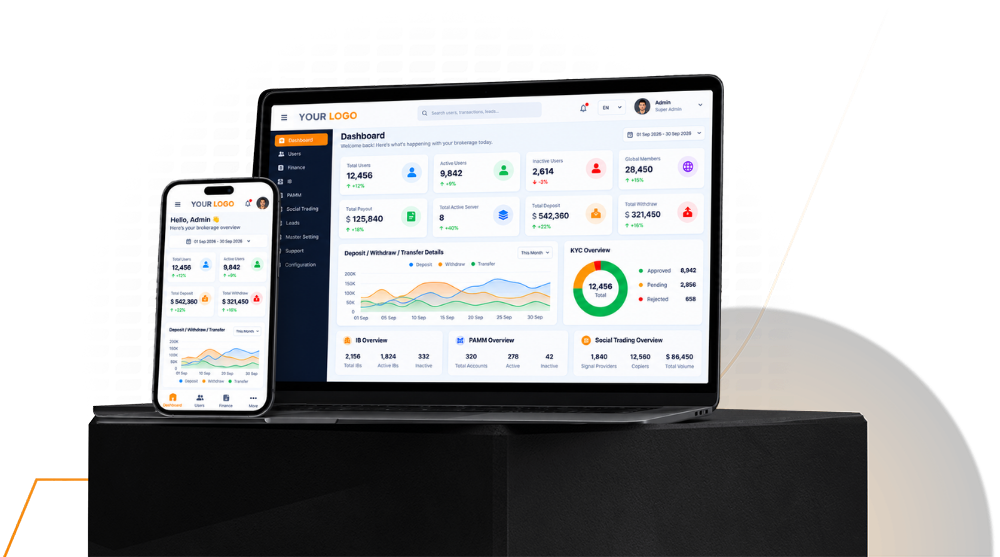
Run your brokerage operations from a branded admin environment built around your workflow, teams, permissions, client management and day-to-day operations.
-
Trader's Room
Give clients a seamless branded environment for registration, KYC, account management, deposits, withdrawals, trading accounts and everyday account activity.
-
IB & Partner Portal
Put your partner network under your brand with dedicated tools for referrals, IB structures, commission tracking, network management, reports and partner activity.
-
Mobile Applications
Extend your brokerage experience to mobile with branded applications that give clients convenient access to accounts, wallets, transactions and other connected services.
-
Emails, Documents & Statements
Keep every client communication consistent with your brand across verification emails, account notifications, transaction updates, statements, reports and documents.
-
Your Domain & Digital Presence
Build a consistent branded presence across your client portals, admin access and connected digital services using your own domain, identity and visual language.
What We Offer
A Complete White-label Solution for Your Brokerage
Everything you need to create a professional, flexible and consistent branded experience for your clients and partners.
-
Fully Branded & Customizable
Use your own logo, colours, content, domain and visual identity to create an experience that feels completely yours.
-
Available Across Devices
Give clients and partners a consistent branded experience across web and mobile, wherever they access your services.
-
Flexible Business Setup
Adapt the solution to your business model with configurable workflows, account structures, partner programs and operational requirements.
-
Seamless Integrations
Connect the services your business already uses, including payment gateways, KYC providers and other essential third-party solutions.
-
Professional User Experience
Deliver a clean, intuitive and consistent experience across client, partner and operational touchpoints under your own brand.
-
Quick Setup & Ongoing Support
Start with a ready-to-customize solution and receive support through configuration, deployment and ongoing platform operations.
How You Go Live
Four Simple Steps to Launch Your Brand
From defining your requirements to launching a fully branded experience, our white-label process keeps setup clear, connected and straightforward.
-
Step 01
Choose
Define your business requirements, select the features and integrations you need, and decide how your white-label solution should be structured.
-
Step 02
Customize
Add your logo, colours, content, domain and brand identity across your CRM, portals, mobile applications and other client-facing touchpoints.
-
Step 03
Connect
Integrate the required payment gateways, KYC providers, trading platforms and other third-party services, then configure your workflows and business settings.
-
Step 04
Launch
Complete the final setup, test your branded environment and go live with your own domain, identity and connected brokerage technology.
Your Brand
Built Around Your Brand, Not Ours
Create a complete white-label experience where your clients and partners interact with your brand across the platform, portals, applications and digital touchpoints.
- Your domain and brand identity
- Your branded mobile applications
- Your client and partner portals
- Cloud or your own server
Questions About White-Label Solution
Everything You Need to Know Before Going White Label
Answers to the key questions brokers ask about branding, setup, customization, deployment and ongoing support.
-
A white-label brokerage solution gives you ready-to-use technology that can be customized and presented under your own brand. Your logo, colours, domain, content and other brand elements can be applied across the CRM, client and partner portals, mobile applications and connected services.
-
You can customize key elements of the experience around your brand, including your logo, colours, content, domain and branded client-facing touchpoints. The solution can also be configured around your business requirements, workflows, integrations and operational setup.
-
Yes. Your white-label environment can be presented using your own domain, logo, colours and brand identity. This helps create a consistent experience across your website, CRM, portals, mobile applications and other digital touchpoints.
-
The launch timeline depends on your branding requirements, selected integrations, domain setup, third-party approvals and overall configuration. Once the required information and accounts are ready, our team can move through customization, integration, testing and deployment efficiently.
-
Yes. The solution can be deployed on your own infrastructure or hosted environment, depending on your business and operational requirements. Our team can support the deployment, configuration, updates and ongoing platform operations.
-
Yes. The white-label solution can be connected with supported third-party services such as payment gateways, KYC providers, trading platforms and other required integrations. The exact setup depends on the providers and services selected for your business.
-
Yes. Support is available throughout setup and after launch to help with configuration, integrations, platform operations and ongoing requirements as your brokerage technology environment evolves.