
Your in-house trading platform
Your trading platform,
Your trading platform,
inside your CRM
Give your brokerage its own trading environment, connected directly with your CRM for a seamless experience across clients, accounts and daily operations.
Get Your Demo- 100%Your Brand
- 3Web, iOS and Android
- 1Connected CRM
- 24/5Market Access
What Your Traders Get
A Complete Trading Experience,
Built for Performance
Give traders a fast, intuitive terminal with advanced charting, flexible order controls, live account visibility and powerful tools for managing trades.
-
TradingView Pro Charts
Give traders advanced charting with real-time market data, historical candles, technical indicators and drawing tools for deeper market analysis.
-
One-Click Trading & SL/TP
Place orders quickly with one-click execution and manage Stop Loss and Take Profit directly from the trading interface.
-
Live P&L & Multi-Account
Keep track of live profit and loss, balances, positions and trading history while giving traders access to multiple accounts from one environment.
-
Copy Trading & MAM
Support managed trading with master and follower accounts, using flexible allocation methods for Copy Trading and MAM strategies.
-
Real-Time Risk Management
Monitor margin, stop-outs, floating P&L and net exposure in real time, with risk alerts designed to keep trading activity under control.
-
Smart A/B Book Routing
Configure routing rules based on account or group requirements and connect A-book flow to liquidity providers through supported FIX or MT5 connectivity.
Where It Runs
One Platform, Every Device
Give traders the flexibility to access their accounts, monitor markets and manage positions wherever they choose to trade.
-
Web Trading
Access the full trading environment directly from a browser without requiring a separate desktop installation, making it easy for traders to get started from any compatible device.
- Browser-based access
- No desktop installation
- Responsive trading interface
- Access from compatible devices
-
Mobile Ready
iOS & Android
Take the trading experience to mobile with dedicated applications that let traders stay connected to markets, accounts and positions while on the move.
- Native mobile experience
- Market monitoring on the go
- Position management
- Account access from mobile
-
Connected to Your CRM
The trading environment works within the same ecosystem as your CRM, keeping client accounts and trading operations connected instead of separating them across different systems.
- Direct CRM connection
- Connected client accounts
- Centralized account data
- One connected ecosystem
How It Goes Live
Four Steps to Launch Your Platform
From setting up your trading infrastructure to connecting your CRM and going live, everything is configured as one connected platform.
-
Step 01
Set Up Infrastructure
Define your instruments, liquidity setup, trading requirements and execution environment to establish the foundation for your trading platform.
-
Step 02
Configure Your Platform
Configure the trading environment, instruments, account settings, trading conditions and required platform functionality around your business requirements.
-
Step 03
Connect Your CRM
Connect the trading platform with your CRM so client accounts, trading activity and essential account information work together across one ecosystem.
-
Step 04
Go Live
Complete testing and final configuration, prepare your web and mobile access, and launch the trading platform for your clients.
The Trading Experience
Everything Traders Need, in One Place
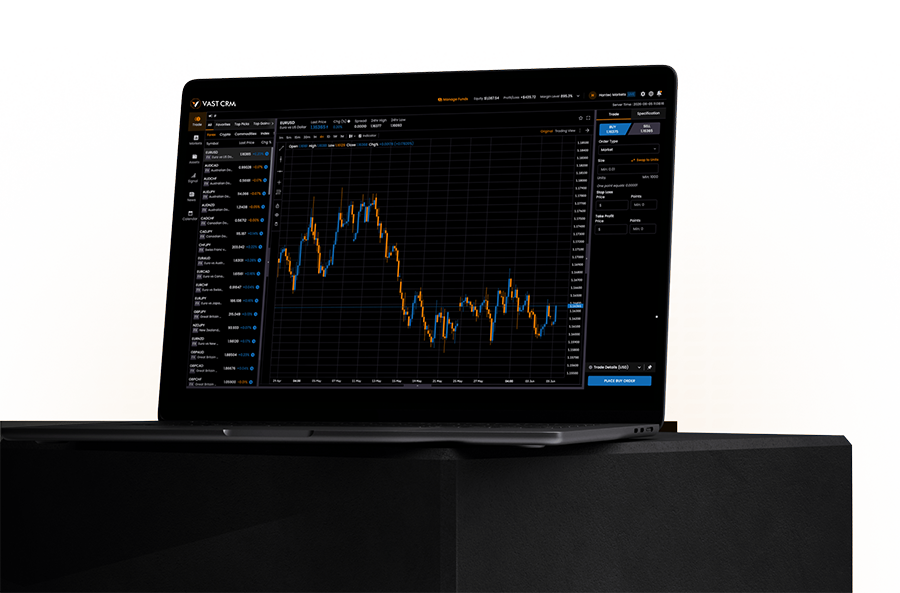
A connected trading environment where market analysis, order execution, positions and account information come together in one streamlined experience.
- Advanced charts & indicators
- Fast order execution
- Live positions & account data
- Web, iOS & Android access
Questions About the Platform
Before You Launch Your Terminal
Answers to the key questions brokers ask when choosing an in-house trading platform connected to their CRM.
-
Yes. The in-house trading platform can be connected with your CRM so client accounts, trading activity and essential account information work together within the same technology ecosystem. This allows your team to manage the brokerage environment without maintaining separate systems for core client and trading operations.
-
The platform can support multiple asset classes, including Forex, metals, indices, commodities, digital assets and shares, depending on the configured market infrastructure and available liquidity connections.
-
Yes. The platform supports TradingView-powered charting with real-time market data, historical candles, technical indicators and drawing tools, giving traders a complete environment for market analysis.
-
Yes. The platform supports Copy Trading and MAM functionality, allowing master accounts to distribute trades to follower accounts using configurable allocation methods such as fixed, multiplier or balance-ratio models.
-
The platform can connect to liquidity providers and aggregate pricing according to the configured setup. Supported connectivity can include FIX and MT5, with configurable markup and routing rules based on your brokerage requirements.
-
Yes. The platform includes real-time monitoring for floating P&L, margin, stop-outs and net exposure, with configurable risk controls and alerts. A/B routing can also be configured according to account, group or other defined rules.
-
Yes. The trading experience is available across web, iOS and Android, allowing traders to access their accounts, monitor markets and manage positions across supported devices.